I have been spending more and more time testing local AI lately, but not for privacy reasons. I do not really believe in that argument anymore. The real reason is cost. What I actually want is a cheaper model for lightweight local RAG, web retrieval, and grounded summaries, with enough reasoning and tool use to be useful without reaching for a larger hosted model every time. Simple app generation is still interesting, but it is not the main target. That is why local benchmarks matter more to me than vague claims like "this one feels faster" or "that one is better for local use."
So I picked two Gemma 4 variants from Unsloth and ran them on my RTX 4070 Ti with llama.cpp:
gemma-4-E4B-it-GGUFinQ8_0gemma-4-26B-A4B-it-GGUFinUD-Q4_K_XL
At first I expected the 26B model to be the obvious winner. Bigger context window, bigger vision stack, more total parameters, more of that "serious model" aura that makes you assume quality must follow. Then I actually benchmarked them. Different story.
The setup
Nothing exotic here. Just a local machine, llama.cpp, and a 12 GB RTX 4070 Ti.
- CPU: AMD Ryzen 9 7950X3D
- RAM available: 16 GB
- GPU: NVIDIA GeForce RTX 4070 Ti
- Threads used for the benchmark: 16
- Build:
llama.cpp5208e2d5b (8641) - Prompt benchmarks tested:
pp512,pp4096,pp8192,pp16384 - Generation benchmarks tested:
tg128,tg256
The goal was simple: understand what these models feel like on real local hardware, not on a product page, not in a benchmark chart detached from context, and not on a machine I don't own.
The local flow
This is the shape of the setup I ended up with:
flowchart LR
    A[RTX 4070 Ti workstation] --> B[llama.cpp]
    B --> C[llama-bench]
    B --> D[llama-cli]
    B --> E[llama-server on :8081]
    E --> F[OpenAI-compatible endpoint /v1]
    E --> G[Anthropic-compatible endpoint /v1/messages]
    F --> H[opencode]
    G --> I[claude-code]
Context length is where things get real
The model card numbers are seductive.
Gemma 4 E4B advertises 128K context. Gemma 4 26B A4B goes to 256K. On paper that sounds like you should just dial the context up and enjoy the extra room. On a 12 GB card, that is not how this plays out.
In practice, context is not free. The KV cache grows with it, and that cost shows up fast when you are already pushing the card with a model that you want fully offloaded. The model weights are only part of the memory story. The cache becomes the other half of the budget.
That is why the practical baseline commands in this post use:
-c 65536Not because Gemma 4 is limited to 64K. It clearly is not. Because 65536 is the lowest setting that feels meaningfully "long context" to me on this setup while still being worth testing locally. It is serious enough to expose the real tradeoffs without pretending the advertised maximum and the practical maximum are the same thing.
Later in the post I use that same 64K setting for the real web app generation test, because at this point that is the minimum context window I actually care about for local experimentation.
KV cache considerations on a 4070 Ti
This is the part worth saying plainly.
If you push context too far, you usually stop talking about model quality and start talking about memory pressure, slower startup, reduced headroom, and awkward tradeoffs between context size and GPU offload. None of that is glamorous, but all of it matters when you are trying to make a local setup pleasant enough to use every day.
The safest mental model is this:
- model weights decide whether the model fits at all
- KV cache decides how far you can push context before the setup becomes annoying
- full offload and large context are often competing goals on mid-range hardware
For my 4070 Ti setup, the sweet spot is not "maximum context." It is "enough context to be useful without wrecking latency or starving VRAM." If I were setting up a real local workflow instead of a synthetic benchmark, 64K is the minimum where I would start testing E4B seriously. That is where the long-context promise starts to feel real. It is also exactly where you need to watch KV cache behavior instead of assuming the card will stay comfortable.
The 26B model makes this even more obvious. It already asks much more from the machine, so large-context experimentation becomes even less forgiving. The longer window is real, but whether it is practical on your local box is a separate question.
What these two models actually are
Before the numbers, the models.

I pulled the high-level specs from the Unsloth model cards because raw benchmark data without architecture context is half a story. Maybe less.
| Property | Gemma 4 E4B | Gemma 4 26B A4B |
|---|---|---|
| Architecture | Dense | Mixture-of-Experts |
| Effective or active parameters | 4.5B effective | 3.8B active |
| Total parameters | 8B with embeddings | 25.2B total |
| Layers | 42 | 30 |
| Sliding window | 512 tokens | 1024 tokens |
| Context length | 128K | 256K |
| Modalities | Text, Image, Audio | Text, Image |
| Vision encoder | ~150M | ~550M |
| Audio encoder | ~300M | None |
That already makes the choice more interesting than a lazy "small model vs big model" comparison.
The E4B is the compact, dense model. It is clearly designed for local and lighter deployments, and it even includes audio support. The 26B A4B is a different beast: a larger MoE model, much longer context, bigger multimodal stack, and the kind of profile that suggests better ceiling, not better speed.
That distinction matters. A lot.
The first benchmark pass
Here are the initial results:
| Model | Quant | Size | GPU layers | pp512 t/s | tg128 t/s |
|---|---|---|---|---|---|
| Gemma 4 E4B | Q8_0 | 7.62 GiB | 33 | 3157.39 ± 332.12 | 27.86 ± 0.49 |
| Gemma 4 26B A4B | UD-Q4_K_XL | 15.95 GiB | 999 | 332.80 ± 12.20 | 13.70 ± 0.19 |
The gap was not subtle.
On prompt processing, E4B was about 9.49x faster. On generation, it was about 2.03x faster. Even before digging deeper, that already told me something practical: on this hardware, the smaller model is dramatically easier to live with.
And that matters more than people admit.
A local model that answers quickly changes how often you use it. It becomes something you reach for between tasks, during debugging, while sketching an idea, or when you want a fast second opinion in the terminal. A slower model might be more capable in some scenarios, but if it drags every interaction down, it stops being a tool and starts becoming an event.
The trap I hit with GPU layers
This is where the benchmark got more useful.
I wanted to rerun E4B with GPU_LAYERS=999 to see how much it benefited from full offload. The script looked ready for it. It had GPU_LAYERS support at the top, so I expected the override to work.
It didn't.
The wrapper was hardcoded to run bench-e4b with 33 GPU layers, which meant my first E4B benchmark understated what the model could actually do on this GPU. That kind of thing is exactly why I like testing locally instead of trusting my assumptions. One overlooked line in a shell script can invalidate the conclusion you thought you were making.
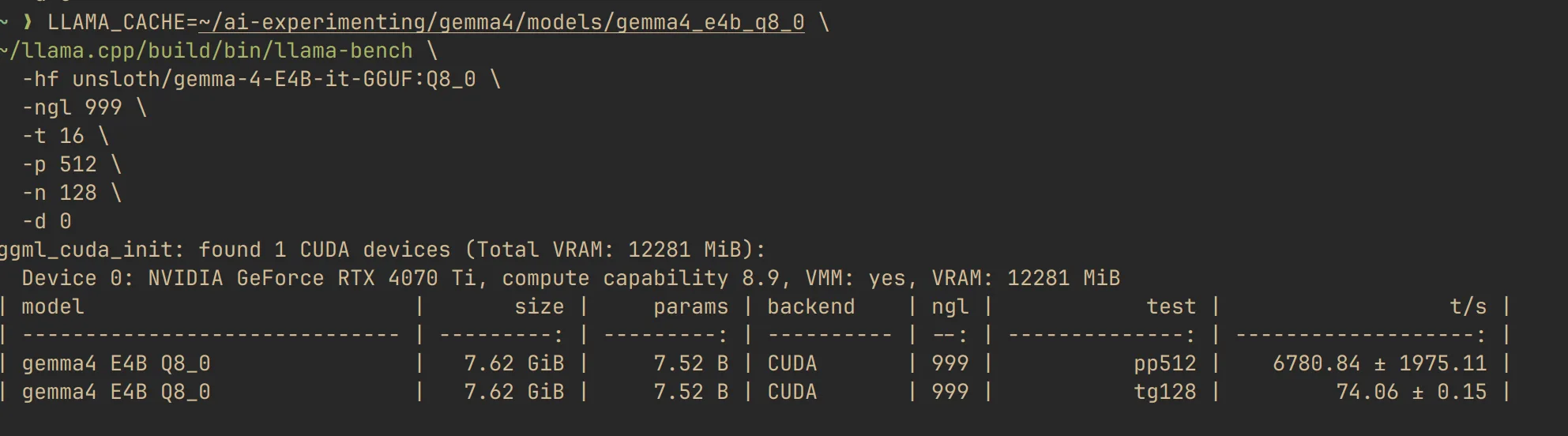
So I ran llama-bench directly with -ngl 999.
E4B at 33 layers vs 999 layers
Here is the comparison that changed the post.
| E4B run | ngl | pp512 t/s | tg128 t/s |
|---|---|---|---|
| Script default | 33 | 3157.39 ± 332.12 | 27.86 ± 0.49 |
| Direct full offload test | 999 | 6757.30 ± 1777.85 | 69.66 ± 1.30 |
That is not a rounding error. That is a different user experience.
Moving E4B from ngl=33 to ngl=999 improved prompt processing by about 2.14x and generation by about 2.50x. In plain terms: once fully offloaded, E4B stopped looking merely "good for a small model" and started looking genuinely pleasant to use.
This also sharpens the comparison with 26B.
If I compare the best local E4B run against the 26B run on the same machine:
- E4B is about
20.3xfaster on prompt processing - E4B is about
5.1xfaster on generation
That does not prove E4B is the better model in every sense. It proves something more useful: for this class of hardware, full-offload E4B sits in a very attractive spot between speed, model size, and local usability.
A more realistic long-context benchmark
The original pp512 and tg128 numbers are useful for comparing raw throughput, but they are still synthetic. Real local usage looks more like pasted documentation, longer chats, repo summaries, and prompts big enough to put pressure on the KV cache.
So I ran a second pass with:
pp4096+tg256pp8192+tg256pp16384+tg256
Here is what happened.
| Model | Prompt size | Prompt processing t/s | Generation t/s | Status |
|---|---|---|---|---|
| E4B | 4096 | 7117.83 ± 7.33 | 70.85 ± 0.06 | completed |
| E4B | 8192 | 6720.76 ± 14.76 | 70.83 ± 0.20 | completed |
| E4B | 16384 | 5992.66 ± 4.84 | 70.84 ± 0.10 | completed |
| 26B A4B | 4096 | 323.74 ± 0.67 | 14.88 ± 0.02 | completed |
| 26B A4B | 8192 | 293.09 ± 0.88 | 15.07 ± 0.18 | completed |
| 26B A4B | 16384 | 268.06 ± 3.03 | not completed | not practically runnable to full completion on this setup |
This is the part I care about most.
E4B degraded gracefully as prompt size increased. Prompt ingestion dropped from roughly 7118 t/s at 4K to 5993 t/s at 16K, but generation stayed essentially flat at around 70.8 t/s. That is exactly the kind of behavior you want from a local model that is supposed to stay usable as context grows.
The 26B model told a harsher story. 4K and 8K completed, but much more slowly, and the 16K run only gave me the prompt-processing result before the full generation side stopped being practical for this workflow. That does not mean the model is broken. It means the combination of model size, context pressure, and local hardware constraints crosses the line from "interesting benchmark" into "not something I would actually want to sit through."
One important caveat: this was a long-context benchmark story, not a universal 26B verdict. In a fresh short-context llama-cli run, the 26B model was much healthier, with roughly 395.5 t/s on prompt ingestion and about 34.0 t/s on generation. That is a perfectly usable local result. So the real distinction is not "26B is always slow." It is "26B is fine on short context, then becomes much harder to trust once the context window starts growing."
That is the real takeaway from the long-context pass: advertised context windows are one thing, runnable local context is another.
How to run this locally
This is the part I always want in posts like this and usually don't get: the exact commands.
Assumptions:
llama.cppis built in~/llama.cpp- you have enough VRAM to fully offload E4B
Benchmark commands
Run the E4B benchmark with full offload:
LLAMA_CACHE=~/ai-experimenting/gemma4/models/gemma4_e4b_q8_0 \
~/llama.cpp/build/bin/llama-bench \
  -hf unsloth/gemma-4-E4B-it-GGUF:Q8_0 \
  -ngl 999 \
  -t 16 \
  -p 512 \
  -n 128 \
  -d 0
Run the 26B benchmark:
~/llama.cpp/build/bin/llama-bench \
  -m ~/unsloth/gemma-4-26B-A4B-it-GGUF/gemma-4-26B-A4B-it-UD-Q4_K_XL.gguf \
  -ngl 999 \
  -t 16 \
  -p 512 \
  -n 128 \
  -d 0
Interactive chat commands
Chat with E4B:
~/llama.cpp/build/bin/llama-cli \
  -hf unsloth/gemma-4-E4B-it-GGUF:Q8_0 \
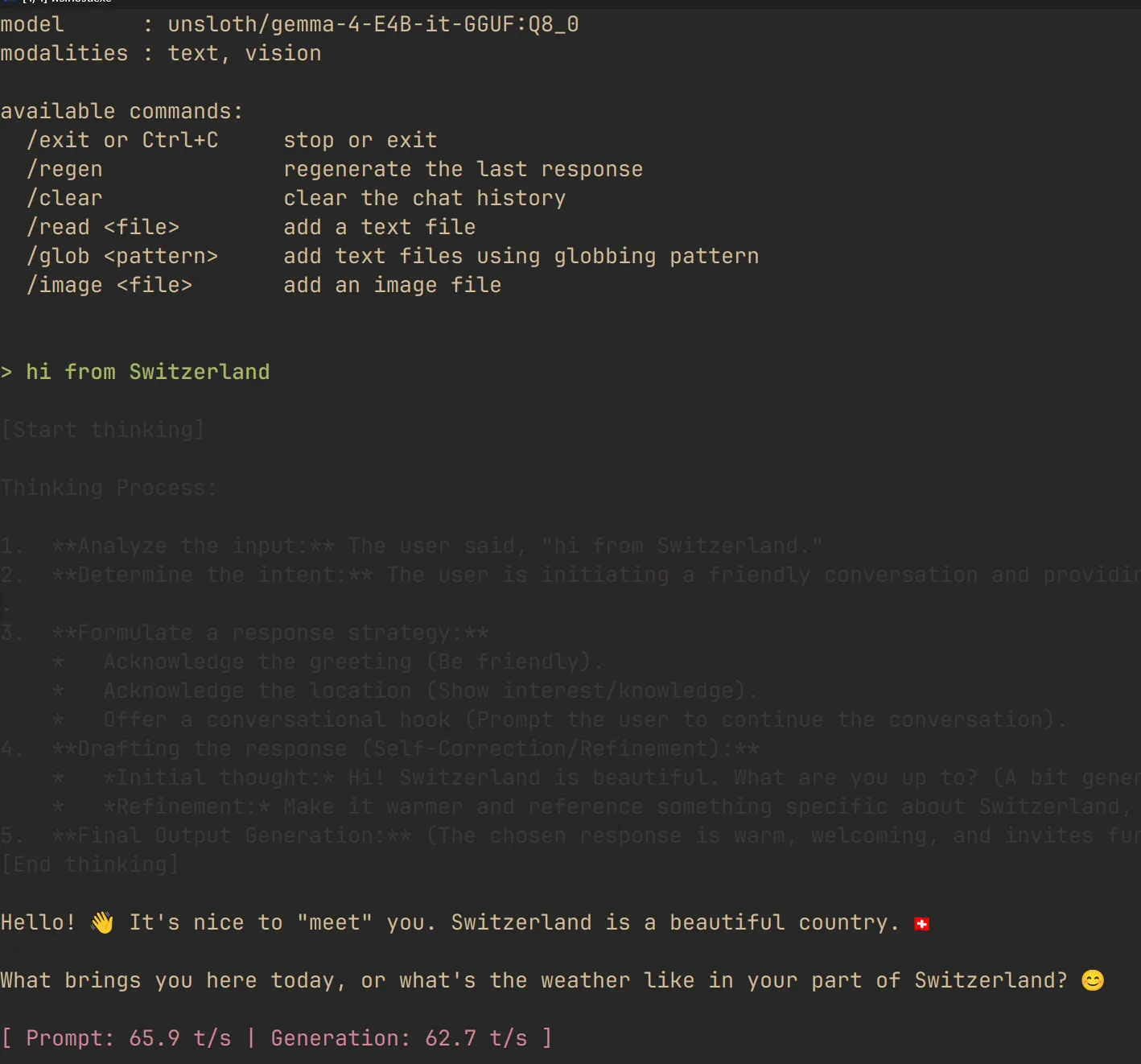
  -ngl 999 \
  -t 16 \
  -c 65536 \
  --temp 1.0 \
  --top-p 0.95 \
  --top-k 64
Chat with 26B:
~/llama.cpp/build/bin/llama-cli \
  -m ~/unsloth/gemma-4-26B-A4B-it-GGUF/gemma-4-26B-A4B-it-UD-Q4_K_XL.gguf \
  --mmproj ~/unsloth/gemma-4-26B-A4B-it-GGUF/mmproj-BF16.gguf \
  -ngl 999 \
  -t 16 \
  -c 65536 \
  --temp 1.0 \
  --top-p 0.95 \
  --top-k 64
Serve 26B with llama-server:
./llama.cpp/llama-server \
  -m /home/moviemaker/unsloth/gemma-4-26B-A4B-it-GGUF/gemma-4-26B-A4B-it-UD-Q4_K_XL.gguf \
  --mmproj /home/moviemaker/unsloth/gemma-4-26B-A4B-it-GGUF/mmproj-BF16.gguf \
  -t 16 \
  -c 65536 \
  --temp 1.0 \
  --top-p 0.95 \
  --top-k 64 \
  --alias "unsloth/gemma-4-26B-A4B-it-GGUF" \
  --port 8001 \
  --chat-template-kwargs '{"enable_thinking":true}' \
  --jinja
On my current setup, this worked better than forcing -ngl. The 26B run was simply more reliable once I stopped trying to hardcode GPU layers.
If you are tempted to increase -c aggressively beyond 64K, do it one step at a time. On paper, long context looks like a free upgrade. Locally, it is usually where KV cache pressure starts dictating the experience.
How to wire it into opencode
This one is straightforward.
llama-server exposes an OpenAI-compatible API on /v1, and opencode already supports OpenAI-compatible providers. In fact, this is very close to the config I already have on my machine:
{
  "$schema": "https://opencode.ai/config.json",
  "provider": {
    "local-llama": {
      "npm": "@ai-sdk/openai-compatible",
      "name": "Local Llama",
      "options": {
        "baseURL": "http://127.0.0.1:8081/v1"
      },
      "models": {
        "gemma-4-e4b": {
          "name": "Gemma 4 E4B",
          "maxContext": 64000
        }
      }
    }
  }
}
Save that in:
~/.config/opencode/config.jsonThen start your server first:
~/llama.cpp/build/bin/llama-server \
  -hf unsloth/gemma-4-E4B-it-GGUF:Q8_0 \
  -ngl 999 \
  -t 16 \
  -c 65536 \
  --jinja \
  --temp 1.0 \
  --top-p 0.95 \
  --top-k 64 \
  --alias "unsloth/gemma-4-E4B-it-GGUF" \
  --port 8081 \
  --chat-template-kwargs '{"enable_thinking":true}'
And launch opencode in another terminal:
opencodeThe important bit is the baseURL. Once llama-server is up, opencode can treat it like any other OpenAI-compatible backend.
A more realistic 64K test prompt
Benchmarks are useful, but they only get you so far.
The more honest test is a real task with a large context budget and a visible output. I ran this through opencode against the local E4B server, so it makes more sense to show the wiring first and the prompt second. For E4B, this is the 64K setup I used:
First, download and serve the model locally with thinking enabled:
hf download unsloth/gemma-4-E4B-it-GGUF \
  --local-dir ~/unsloth/gemma-4-E4B-it-GGUF \
  --include "gemma-4-E4B-it-Q8_0.gguf" \
  --include "mmproj-BF16.gguf"

./llama.cpp/llama-server \
  -m unsloth/gemma-4-E4B-it-GGUF/gemma-4-E4B-it-Q8_0.gguf \
  --mmproj unsloth/gemma-4-E4B-it-GGUF/mmproj-BF16.gguf \
  --temp 1.0 \
  --top-p 0.95 \
  --top-k 64 \
  --alias "unsloth/gemma-4-E4B-it-GGUF" \
  --port 8001 \
  --chat-template-kwargs '{"enable_thinking":true}' \
  --jinja
For the 26B comparison run, I used the same general setup pattern with the larger model:
hf download unsloth/gemma-4-26B-A4B-it-GGUF \
  --local-dir ~/unsloth/gemma-4-26B-A4B-it-GGUF \
  --include "gemma-4-26B-A4B-it-UD-Q4_K_XL.gguf" \
  --include "mmproj-BF16.gguf"

./llama.cpp/llama-server \
  -m unsloth/gemma-4-26B-A4B-it-GGUF/gemma-4-26B-A4B-it-UD-Q4_K_XL.gguf \
  --mmproj unsloth/gemma-4-26B-A4B-it-GGUF/mmproj-BF16.gguf \
  --temp 1.0 \
  --top-p 0.95 \
  --top-k 64 \
  --alias "unsloth/gemma-4-26B-A4B-it-GGUF" \
  --port 8001 \
  --chat-template-kwargs '{"enable_thinking":true}' \
  --jinja
Create a production-ready landing page web app for a futuristic architecture studio called MONOLITH.
Requirements:
- Use a premium editorial visual style, not a generic startup template.
- The design should feel cinematic, expensive, and highly art-directed.
- Use strong typography, layered backgrounds, elegant spacing, and a memorable layout.
- Include subtle but polished animations and microinteractions.
- Make it fully responsive for desktop, tablet, and mobile.
- Include these sections:
- Hero
- Studio manifesto
- Featured projects
- Design process
- Testimonials
- Contact / call to action
- Add interactive elements such as hover states, animated cards, smooth scrolling, or section reveals.
- The page should feel custom-designed for an architecture brand, with references to space, material, light, geometry, and form.
- Avoid placeholder-looking UI.
- Avoid generic gradients and generic SaaS patterns.
- Use a clear design system with reusable spacing, colors, and type styles.
Technical requirements:
- Return production-ready code.
- Build the whole app in a single self-contained file if possible.
- Use clean, maintainable structure.
- Do not include reasoning, hidden thinking, or explanation.
- Output only the final code.I like this prompt because it is not a toy. It asks for structure, visual taste, motion, responsiveness, and enough implementation detail that weaker local models usually collapse into something generic.
I also learned something useful from this test. Both webapp runs were done with thinking enabled. That made the comparison fair, but it also reminded me how quickly the context budget can disappear once you are asking a local model to reason and generate at the same time. It is one more reason I care more about practical local RAG and grounded summarization than about pushing these models into elaborate front-end generation loops.
It also reflects how I would actually use a local model: not just for chat, but for something substantial enough to show whether the latency and context settings still feel acceptable.
What the two models actually produced
First, the MONOLITH prompt generated with Gemma 4 E4B.
<video controls playsinline preload="metadata" width="100%"> <source src="monolith-webapp-demo.mp4" type="video/mp4"> </video>
Then the same prompt again, this time with Gemma 4 26B A4B on the same local setup.
<video controls playsinline preload="metadata" width="100%"> <source src="monolith-webapp-demo-26b.mp4" type="video/mp4"> </video>
This is where the tables stop helping and the result matters. On this prompt, the 26B output is plainly better. E4B is still the faster and more practical local default, but the bigger model produced the stronger webapp result on my current setup.
The E4B run also exposed a real limitation in my current setup. The image path was broken there, so I would not use that E4B setup as-is for production front-end generation that depends on visual inputs. That did not decide the whole comparison, but it did push me back toward the use case I care about more anyway: local RAG and agentic tool use, where the hard part is grounding, retrieval, and execution.
There was also a more ordinary tooling weakness in the E4B run on my current setup. Even with edit permissions already allowed, I still had to tell it multiple times to actually write files. That is the kind of friction that matters in practice. A local model does not need to be perfect, but it does need to stop making you repeat obvious instructions.
How to wire it into Claude Code
This one is more experimental, so I want to be precise.
According to the llama.cpp server docs, llama-server exposes an Anthropic-compatible POST /v1/messages endpoint. According to Anthropic's Claude Code gateway docs, Claude Code can be pointed at a custom Anthropic-style base URL through ANTHROPIC_BASE_URL. That means you can try routing Claude Code through your local llama-server.
The practical setup looks like this:
Start the server with --jinja enabled:
LLAMA_CACHE=~/ai-experimenting/gemma4/models/gemma4_e4b_q8_0 \
~/llama.cpp/build/bin/llama-server \
  -hf unsloth/gemma-4-E4B-it-GGUF:Q8_0 \
  --alias gemma-4-e4b \
  -ngl 999 \
  -t 16 \
  -c 65536 \
  --jinja \
  --port 8081
Then in another shell:
export ANTHROPIC_BASE_URL=http://127.0.0.1:8081
export ANTHROPIC_AUTH_TOKEN=local-llama
export ANTHROPIC_MODEL=gemma-4-e4b

claude --dangerously-skip-permissions
Or for a one-shot prompt:
ANTHROPIC_BASE_URL=http://127.0.0.1:8081 \
ANTHROPIC_AUTH_TOKEN=local-llama \
ANTHROPIC_MODEL=gemma-4-e4b \
claude -p "Summarize this repository and tell me where the tests live"
Two caveats.
First, this is an inference built from two compatibility layers, not a setup Anthropic explicitly documents for llama.cpp. Claude Code officially documents custom Anthropic-style gateways. llama.cpp documents an Anthropic-compatible messages endpoint that "suffices to support many apps." Those two facts make the experiment reasonable, but not guaranteed.
Second, I would expect basic prompting to work more reliably than full agentic tool loops. If your goal is local coding assistance with minimal fuss, opencode is the cleaner fit today because its configuration is explicitly OpenAI-compatible and llama-server exposes that path very cleanly.
So which one would I actually use?
For day-to-day local work on a 4070 Ti, I would still pick E4B first.
Not because the 26B model is bad. It isn't. The 26B A4B has the bigger context window, the bigger visual stack, and the kind of architecture that may well reward you in harder tasks where answer quality matters more than latency. If I were evaluating deeper reasoning, longer-context retrieval, or multimodal tasks where the extra capacity might show up clearly, I would still keep it around.
And to be fair to the bigger model, in my current setup it also needed less steering. The 26B run was more likely to understand the direction with fewer follow-up corrections, even if the overall interaction stayed slower. The tooling path still was not ideal there either.
But most local workflows are not that romantic. They are messy. Repetitive. Interrupt-driven. You ask a question, try a prompt, adjust, rerun, compare, move on. Speed wins those loops.
That is where E4B still makes sense.
It is small enough to fit comfortably. Fast enough to feel responsive. And once I tested it with full offload, it became obvious that I had almost underrated the model.
That is a very normal local-LLM mistake. One bad setting and you end up benchmarking your wrapper instead of the model.
What I took away from this
Three things.
First, benchmark the thing you are actually running, not the thing you think you configured. In my case, one hardcoded shell argument changed the story.
Second, local model choice is not just about parameter count or architecture prestige. It is about interaction quality. If a model is fast enough to stay in your loop, you will learn its strengths. If it is slow enough to annoy you, you will quietly stop using it.
Third, E4B is the one I would recommend first for this GPU tier if your real goal looks like mine: lightweight local RAG, fetching information from the web, summarizing it well, and handling smaller tool-using tasks without turning every query into an expensive hosted-model decision.
The next steps are a local RAG test and then an OpenClaw run. After seeing the image path break in the webapp experiment, that feels like the more useful question anyway: can E4B retrieve the right context, summarize it cleanly, stay grounded once web fetching enters the picture, and still hold up once tool use, state, and longer agentic loops enter the picture?
Give the 26B model a shot if you are exploring quality ceilings, longer context, or multimodal work where the larger stack may matter. But if your priority is a local assistant that feels snappy in llama.cpp and is mainly there to help with RAG, web retrieval, and summarization, E4B is where I would start.
At least now the next benchmark should be measuring the model, not my mistake.